
Workflow automation
Workflow automation consulting with Make
Stop being the integration between your tools.
I offer workflow automation consulting for teams that copy data between tools by hand: Make workflows that connect your CRM, forms, documents, Slack and spreadsheets, with duplicate prevention, error alerts and human approval where it matters. You keep the account and a plain-English runbook.
When this helps
Start with the problem, not another tool.
I review the current setup before recommending software, channels, or a larger build.
Someone retypes form or spreadsheet details into the CRM
Contracts are rebuilt from CRM data for every deal
Existing Make scenarios break quietly or have no owner
Your agency has more automation builds than builders
What workflow automation consulting covers
Workflow automation consulting covers the decisions around an automation as well as the build: which process to automate, how data moves between tools, which platform fits, how failures get caught and who owns the result. A Make.com expert can hand you a build; a workflow automation consultant should also make those decisions with you. Alongside the Make build itself, my workflow automation services cover four areas:
- Process mapping: the trigger, tools and people involved in one real run
- Systems integration consulting: how your CRM, forms, documents, Slack, Airtable and spreadsheets pass data to each other
- Cleanup: Make scenarios that break, overlap or lack an owner
- Handoff: documentation and account ownership your team keeps
Workflows worth automating first
Not every repetitive task is ready to automate: if the steps or data still vary from run to run, fix the process first with marketing operations consulting. When they don't, the first test I apply as a business process automation consultant is whether the process has all four of these:
- 01A clear trigger: a form submission, a deal stage change or a date.
- 02The same steps every time, with exceptions you can list.
- 03Data that already lives in a tool, not in someone's head.
- 04A real cost when it is missed, like a slow lead response or a wrong contract.
CRM workflow automation: lead capture, record updates and handoffs
Form submissions create or update the right record, assign an owner and create the follow-up task, while automated lead routing decides who gets which lead. Where HubSpot's own workflows cannot reach a tool, a HubSpot and Make integration carries the update across. If the CRM needs setting up, start with HubSpot implementation.
Contract and document generation from CRM data
Deal data fills the right template, the draft lands in the deal's folder and its link goes back to the CRM. Missing required fields are flagged, and a person approves before anything reaches the client.
Slack reminders and team notifications
A CRM and Slack integration alerts the one person who needs to act when a deal stalls or a task goes overdue, instead of a channel-wide message everyone ignores.
Data syncs between Airtable, spreadsheets and the CRM
Decide first which system owns each field, which key matches records (a record ID is safer than an email address) and which side wins a conflict. If the synced data feeds reporting, pair it with automated reporting dashboards.
AI steps inside a workflow, with human review
An AI step can summarize a form response, classify a request or draft a reply, with human approval before its output reaches a client or a CRM field. The guide to AI marketing workflows has more examples.
CRM automation: which jobs stay inside the CRM
CRM automation is a set of rules that create, update and move CRM records when something happens, so nobody does it by hand. I keep each job in the CRM's own workflows and native integrations when your subscription covers every step, and use Make only when a step needs a tool the CRM can't reach.
Customer-facing email journeys usually belong in your marketing automation platform, not in Make; the guide to marketing automation vs workflow automation explains the split.
With HubSpot, I set up native workflows as part of HubSpot consulting; with another CRM, I build what it can't handle in Make. Automation copies whatever data it gets, so clear existing duplicates and missing owners with the CRM audit checklist first. For a small B2B team, CRM automation usually covers five jobs:
| Job | Usually runs in | Safeguard |
|---|---|---|
| Creating a record from a form | The CRM for native forms, otherwise Make | Search by email first, so a resubmission or re-run updates the record instead of duplicating it |
| Assigning an owner | The CRM, unless the rules need another tool's data | Only one automation writes the owner field, with a fallback owner, as in how to set up lead routing |
| Updating lifecycle and deal stages | The CRM | Automations only move stages forward; a person moves them back |
| Creating tasks and alerts | The CRM, unless an alert needs another tool's data | Triggered by one field change, not any edit, so later edits don't create a second task |
| Syncing CRM data to documents or other tools | Make, unless a native integration covers it | A filter skips updates the integration made itself, so neither system re-triggers the other |
Two Make builds, start to finish
Both builds were for Icono-Labs and connected tools the team already used.
Contract generation automation (Make + CRM)
From the contract generation automation case study:
- Before: contracts were prepared by hand from CRM records, templates and shared folders.
- Build: client, project, pricing and staffing data flows from the CRM into the right documents, with separate paths for new and returning clients and one Statement of Work per scope, from 25 standardized contract templates.
- Safeguards: missing required information is flagged for review, and final review and approval stay with the team.
- Result: less repetitive preparation, one repeatable process, and contract information that stays connected from the CRM through delivery handoff.
Project closeout automation (Make + Slack)
From the project closeout automation case study:
- Before: Slack messages and manually kept records produced generic notifications, duplicate channels and limited deadline visibility.
- Build: private project channels created from Project Tracker data, with duplicate-prevention logic so record updates do not create extra channels.
- Targeting: reminders go only to incomplete projects marked reportable to Coupa that are due within seven days or overdue, every Monday and Wednesday, via the assignee's DM, the project channel and a central closeout channel.
- Result: targeted alerts replaced generic notifications, and duplicate workspaces were prevented.
Process
How it works
Step 1
Map the current process
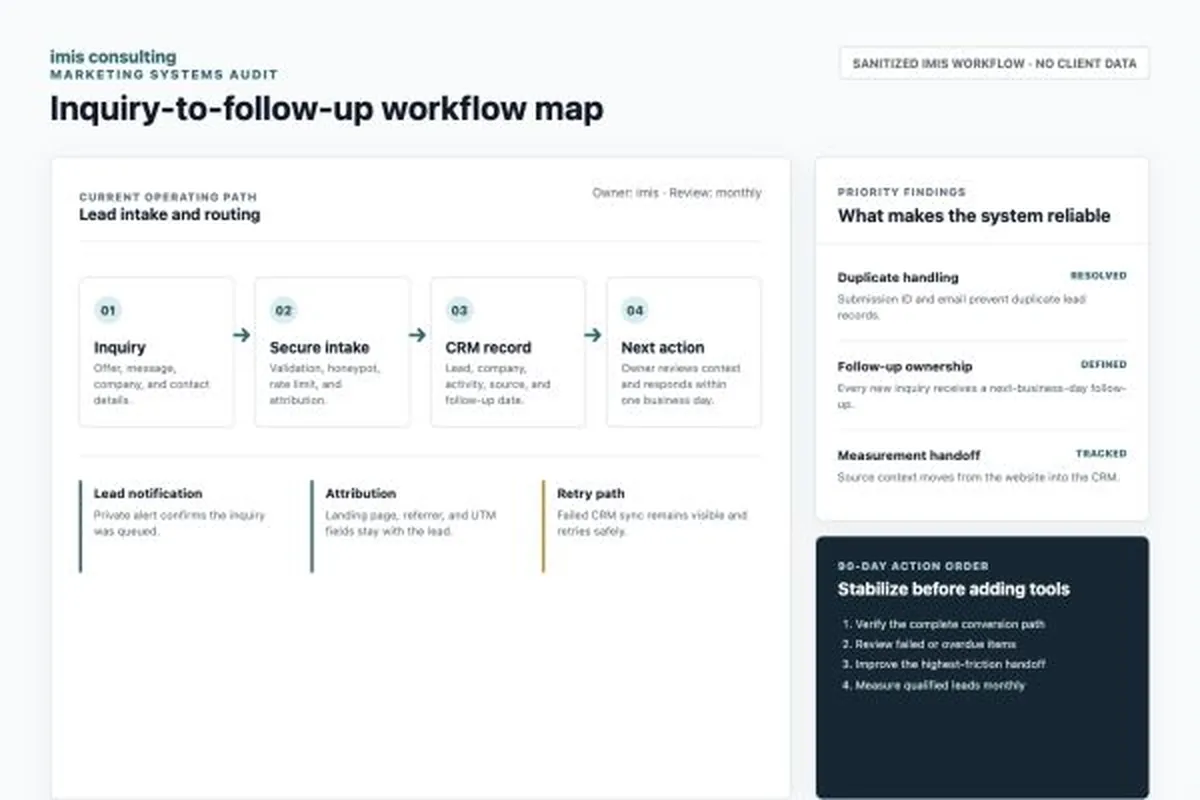
We trace one real run: the trigger, each tool, who acts at each step and where data gets retyped. That map becomes the build spec.
Step 2
Build and test with safeguards
I build in Make and test the failure cases: duplicate prevention, error alerts that name the failed step, and human approval before anything reaches a client, gets signed or deletes records.
Step 3
Hand over the account, credentials and documentation
It runs in your company's account with connections your team authorized, plus a runbook: what triggers it, how to pause it and what to check when an alert fires.
What you receive
An outcome your team can actually use.
One scoped process running as a Make workflow in your company's account, tested against duplicates, missing data and failed runs, and documented in a plain-English runbook.
Bring one process that eats time every week, plus one real example of a record that goes through it.
Scope boundaries
What this does not include.
Clear exclusions protect the timeline and make a useful follow-on recommendation possible when the evidence supports one.
- Automations that message clients, sign, delete or publish without human approval
- Ongoing monitoring after handoff, unless scoped separately
- A CRM rebuild or migration, which is scoped as separate CRM work
- Platform subscriptions and app fees, billed to your own accounts
Questions
Questions before you start
Next step
Show me the step your team repeats by hand every week.
In 20 minutes we'll look at where the process starts, which tools it touches and what breaks when it is missed, then decide whether Make, your CRM's own workflows or no automation fits.
Book a 20-minute workflow review